

Managing money has become easier than ever thanks to modern budgeting apps. Whether you want to save more, reduce debt, monitor subscriptions, or track investments, the right budgeting app can completely transform your financial habits.
However, with dozens of apps available today, choosing the best budgeting app can feel overwhelming. Some apps focus on automation, while others encourage hands-on budgeting. Some are designed for beginners, while others cater to advanced financial planners.
So, how do you choose the right budgeting app for your needs?
This guide will help you understand the most important factors to consider before downloading a budgeting app, ensuring you pick a tool that actually fits your lifestyle and financial goals.
Why Budgeting Apps Matter
A good budgeting app does more than track spending. It helps you:
- Understand where your money goes
- Build better financial habits
- Reduce unnecessary expenses
- Create savings goals
- Track debt repayment
- Monitor investments and net worth
- Improve long-term financial planning
Today’s budgeting tools combine automation, analytics, and personalized insights to help users make smarter financial decisions without relying on spreadsheets or manual calculations.
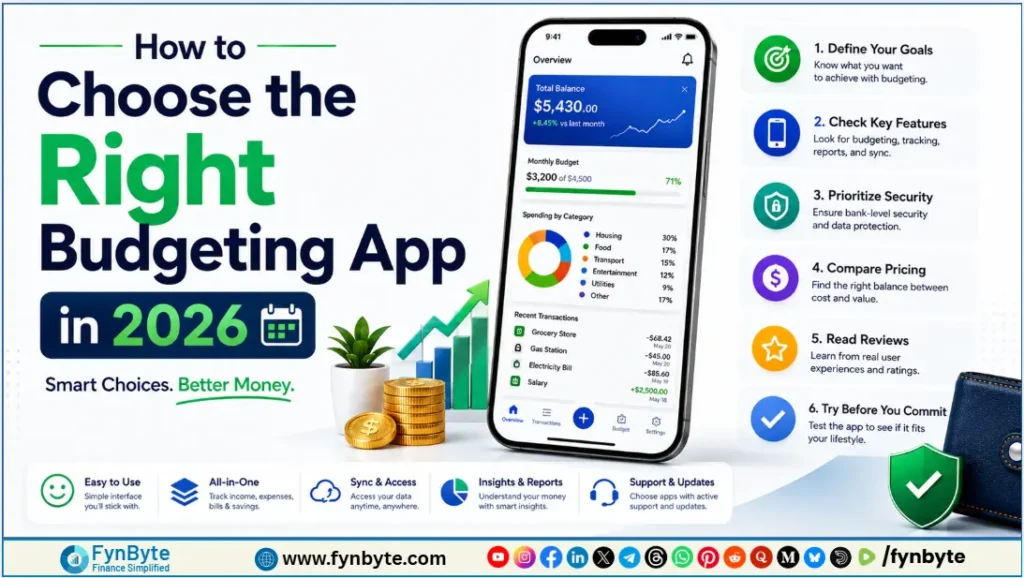
How to Choose the Right Budgeting App in 2026
1. Identify Your Financial Goals
Before selecting a budgeting app, start by asking yourself one important question:
What do you want to achieve financially?
Different apps specialize in different financial objectives. Understanding your priorities helps narrow your options quickly.
If Your Goal Is Cutting Unnecessary Expenses
Many people lose money through forgotten subscriptions and recurring charges. If your main goal is reducing wasteful spending, subscription-tracking apps can be extremely useful.
The Rocket Money app is popular for identifying unused subscriptions and helping users cancel them easily. It also provides spending alerts and bill negotiation features that can help lower monthly expenses.
If Your Goal Is Tracking Investments and Net Worth
Some users want a complete financial overview instead of simple budgeting tools. In that case, apps focused on wealth tracking may work better.
The Empower app is widely recognized for monitoring:
- Investment accounts
- Retirement savings
- Cash flow
- Net worth
- Long-term financial progress
It’s especially useful for users interested in financial planning and investment management.
2. Match the App to Your Budgeting Style
Not all budgeting methods work for everyone. Some people prefer strict planning, while others want flexible spending categories.
Understanding your budgeting personality is key to choosing the right app.
Zero-Based Budgeting
Zero-based budgeting means assigning every dollar a purpose before the month begins.
For example:
- Rent
- Groceries
- Savings
- Entertainment
- Debt payments
Every dollar is accounted for until your income minus expenses equals zero.
Best Apps for Zero-Based Budgeting
You Need A Budget (YNAB)
YNAB is one of the most respected budgeting apps for serious budgeters. It encourages intentional spending and long-term financial discipline.
Key features include:
- Goal tracking
- Real-time budgeting
- Debt payoff planning
- Financial education tools
YNAB works especially well for users committed to actively managing their finances.
EveryDollar
EveryDollar offers a simpler approach to zero-based budgeting. It’s beginner-friendly and allows users to customize categories easily.
Many users appreciate its clean interface and straightforward setup.
Envelope Budgeting
Envelope budgeting involves dividing money into spending categories like:
- Groceries
- Transportation
- Dining out
- Utilities
Traditionally, people used physical envelopes filled with cash. Modern budgeting apps now provide virtual envelope systems.
Best App for Envelope Budgeting
Goodbudget
Goodbudget is one of the top digital envelope budgeting apps available today.
It helps users:
- Allocate spending limits
- Track shared household budgets
- Plan future expenses
- Avoid overspending
This budgeting style works well for people who need stricter control over discretionary spending.
3. Decide Between Automation and Manual Tracking
Another major factor when choosing a budgeting app is deciding how involved you want to be in the budgeting process.
Some users prefer complete automation, while others benefit from manually entering transactions.
Automated Budgeting Apps
Automated apps connect securely to your:
- Bank accounts
- Credit cards
- Loans
- Investment accounts
They automatically import and categorize transactions.
Benefits of Automation
- Saves time
- Provides real-time updates
- Reduces manual work
- Offers spending insights automatically
- Makes financial tracking easier
Recommended Automated App
Monarch Money
Monarch Money is highly regarded for its automation features and clean dashboard.
Users can:
- Sync multiple financial accounts
- Monitor spending trends
- Create collaborative family budgets
- Track financial goals
It’s ideal for busy professionals or families who want convenience without sacrificing detailed financial insights.
Manual Budgeting Apps
Some people actually benefit from entering every transaction manually.
Typing in each coffee purchase or grocery bill creates stronger awareness of spending habits.
Benefits of Manual Budgeting
- Encourages mindful spending
- Builds accountability
- Improves spending discipline
- Often comes with free or lower-cost plans
Manual apps are excellent for users trying to break bad spending habits or regain control of their finances.
4. Compare Costs and Features
Budgeting apps vary significantly in pricing and functionality.
Some offer free plans with limited tools, while others require monthly or annual subscriptions for premium features.
Common Premium Features
Paid budgeting apps often include:
- Bank syncing
- Advanced reporting
- Debt payoff calculators
- Investment tracking
- Shared household budgeting
- Unlimited spending categories
- Financial coaching tools
Before paying for an app, evaluate whether the premium features actually support your financial goals.
Also Read: 10 Best Budgeting Apps In The USA (2026 Review & Comparison)
Best Completely Free Budgeting App
NerdWallet App
If you want a strong free budgeting solution, the NerdWallet app is a solid option.
It offers:
- Account linking
- Credit score monitoring
- Net worth tracking
- Spending analysis
- Financial recommendations
Unlike many competitors, NerdWallet provides substantial functionality without placing key features behind a paywall.
Other Important Features to Consider
When comparing budgeting apps, also pay attention to these factors:
Security
Choose apps that use:
- Bank-level encryption
- Multi-factor authentication
- Secure account connections
Financial data security should always be a top priority.
Ease of Use
A budgeting app should simplify your financial life, not complicate it.
Look for:
- Clean dashboards
- Easy navigation
- Mobile accessibility
- Fast syncing
Goal Tracking
Many modern apps include visual savings goals for:
- Emergency funds
- Vacations
- Home purchases
- Debt reduction
These tools can help maintain motivation over time.
Family and Shared Budgeting
If you manage finances with a partner or family, choose apps with collaborative budgeting features.
Apps like Monarch Money excel in shared budgeting environments.
Which Budgeting App Is Best for Beginners?
For beginners, simplicity matters most.
The easiest budgeting apps for new users typically include:
- EveryDollar
- NerdWallet
- Goodbudget
These apps offer intuitive interfaces without overwhelming financial complexity.
Which Budgeting App Is Best for Advanced Users?
Advanced users often prefer more robust tools with deeper financial analytics.
Top choices include:
- YNAB
- Monarch Money
- Empower
These apps provide advanced planning and long-term financial tracking capabilities.
Also Read: YNAB vs Monarch Money (2026 Comparison): Which Budget App is Worth It?
Final Thoughts
The best budgeting app is the one you’ll consistently use.
There’s no single perfect app for everyone because financial habits, goals, and lifestyles differ from person to person.
Before making your decision:
- Define your financial goals
- Choose a budgeting method that fits your personality
- Decide between automation or manual tracking
- Compare pricing and features carefully
Whether you want to eliminate debt, grow savings, monitor investments, or simply gain control over daily spending, the right budgeting app can make financial management significantly easier.
Start with a free version whenever possible, test the features, and upgrade only if the premium tools truly add value to your financial journey.
Frequently Asked Questions
1. What is the best budgeting app for beginners?
The best budgeting apps for beginners are EveryDollar, NerdWallet, and Goodbudget. These apps offer simple interfaces, easy setup processes, and helpful budgeting tools without overwhelming new users.
2. Are budgeting apps safe to use?
Most reputable budgeting apps use bank-level encryption and secure connections to protect user data. Apps like Monarch Money, YNAB, and Empower use advanced security measures including multi-factor authentication.
3. Which budgeting app is completely free?
NerdWallet is one of the best completely free budgeting apps available. It offers account syncing, credit score tracking, spending analysis, and net worth monitoring without requiring a paid subscription.
4. What is zero-based budgeting?
Zero-based budgeting is a budgeting method where every dollar is assigned a specific purpose before the month begins. Your income minus expenses equals zero, helping users control spending more effectively.
5. Is YNAB worth paying for?
YNAB (You Need A Budget) is worth paying for if you want detailed budgeting tools, debt reduction planning, and strong financial discipline. Many users find it highly effective for improving long-term money management habits.
7. What is the difference between manual and automated budgeting apps?
Automated budgeting apps connect to your financial accounts and automatically track transactions. Manual budgeting apps require users to enter expenses themselves, encouraging more mindful spending habits.
8. Which budgeting app is best for couples?
Monarch Money and Goodbudget are excellent budgeting apps for couples because they support shared financial planning, collaborative budgeting, and household expense tracking.
9. Can budgeting apps help improve credit scores?
Some budgeting apps, like NerdWallet, include credit score monitoring tools. While budgeting apps do not directly increase credit scores, they can help users manage debt and make timely payments more consistently.
10. Which budgeting app is best for tracking investments?
Empower is considered one of the best apps for investment tracking and net worth monitoring. It provides a complete overview of retirement accounts, portfolios, and overall financial health.
11. What should I look for in a budgeting app?
When choosing a budgeting app, consider:
• Ease of use
• Security features
• Automation capabilities
• Goal tracking
• Budgeting style compatibility
• Pricing
• Investment and debt tracking tools
12. How much do budgeting apps cost?
Budgeting app costs vary. Many apps offer free versions, while premium subscriptions typically range from $5 to $15 per month depending on features like bank syncing, investment tracking, and advanced analytics.
13. How to Choose the Right Budgeting App?
1. Identify Your Financial Goals
2. Match the App to Your Budgeting Style
3. Decide Between Automation and Manual Tracking
4. Compare Costs and Features